
Begin with the decision
The useful answer matters more than the storage label
Staff rarely ask for a data platform. They ask if enough material is on hand, which orders need work, or why a job status changed.
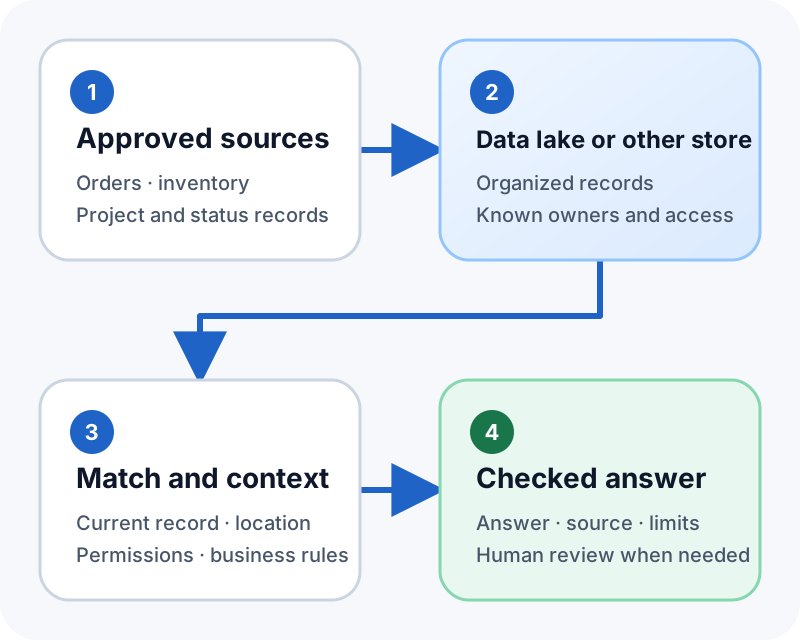
A useful system starts with that question. It finds approved records, checks what each field means, and gives staff enough facts to act.
A data lake may be one source in that path. A database, spreadsheet, document store, or business application may be another. The right design depends on the records that already exist.
Three answers within reach
Start here: three questions your data can already answer
Most teams can answer three useful questions from records they already keep, without new storage and without a long project. Each one needs a few known sources, a rule for matching them, and a note about how fresh the answer is.
What do we have, and where is it? A workflow reads the item list and the counts held per location, adds them up, and shows a line for each yard or truck. The answer should also show when each location was last counted. A total without it invites a decision nobody can defend.
What is late or stuck? A workflow reads the open orders, compares the promised date with today, and lists everything past due with the days late and the person responsible. The calculation is simple, but teams may not run it consistently. An automatic report can make the answer available when work begins.
What has this job cost so far? A workflow adds the committed purchase orders and the posted invoices for one job code, shows the two figures separately, and names any source it could not read. Keeping commitments and actuals apart matters more than the total.
The time spent hunting for answers like these is the cost people rarely count. In a 2018 survey of nearly 600 construction leaders by FMI and PlanGrid (the Construction Disconnected report), respondents reported spending about five and a half hours a week looking for project information. PlanGrid, now part of Autodesk, sells construction software and has an interest in that finding, and the figure is eight years old.
Use the records employees trust
Connect the records employees already use
Orders, prices, stock, job costs, tasks, and status updates may live in different systems. Putting those records in one place does not make them useful by itself.
Know the owner
Identify which application or team owns each record and who may use it.
Keep business meaning
Keep units, project links, locations, dates, and clear status terms.
Check freshness
Show when a source was updated and whether the answer may be incomplete.
Most sources connect through an API — a controlled way for software systems to share data. Sources may also connect through an approved export, database access, or another supported path. See how those connections come together in a working data pipeline.
An answer needs evidence
Check context before presenting an answer
“Do we have enough pumps?” needs more facts. The system must know the project, item, amount needed, sites, and stock on hand.
The workflow should match those details before it explains the result. If the request is unclear, it can ask a follow-up question or route the case to a person.
When the evidence is approved documents rather than database rows, see custom RAG solutions beyond basic chatbots.
Data rules come first
Keep access and retention controlled
Access should follow the rules set for the work. A field worker, project lead, and company head may each need different records.
Set a retention period for each type of record. The team should know how long requests, source copies, draft answers, and audit logs — a record of who did what, and when — will stay.
Read the control checklist
Confirm the approved sources, record owners, user roles, retention period, and review rules before connecting an AI model.
A note on privacy: in our projects, customer data is not used to train AI models, and access is restricted. If you need computing reserved for you alone, that is available and costs more — we will say how much before you decide.
Keep the first scope small
Start with one operational question
Choose one question staff answer often and can check in known records. Name four things: where the data comes from, which facts you need from it, how fresh it has to be, and who handles it when something breaks.
BusinessForward can turn supported messages and records into checked business data. See AI Data Extraction and Business Record Automation. When an answer must move between apps, AI Workflow Automation and Software Integration can link the next approved step. When the records already sit in SQL tables or spreadsheets, see turning SQL and spreadsheet data into useful records.
Short answers
Common questions
Do we need a data lake before we can do this?
Usually not. If the records sit in three or four applications that each offer a supported way to read them, a workflow can ask each one and assemble the answer. A shared data store may help when the number of sources grows, historical records matter, or reporting slows the operating systems.
How current does an answer have to be?
That is a business decision, and it belongs in writing for each question. A stock figure someone acts on within the hour has to be live; a month-to-date cost figure can be hours old without hurting anyone. The answer decides whether you copy data on a schedule or read the source each time.
Related reading
Continue exploring
Turn SQL and Spreadsheet Data Into Records
Match business meaning and validate details before writing a record.
From Data Pipelines to Better Business Decisions
See how a sound data pipeline moves and checks information.
Custom RAG Solutions Beyond Basic Chatbots
See how retrieval turns approved sources into a checked answer.