
Check availability
Do we have the required part or tool? Where is it? How much is available?
Field service operations
BusinessForward designs and implements AI workflows for the software your field teams already use.
Start with parts, tools, inventory, work orders, or service updates that employees still move between systems by hand.

Best fit
How do you know a workflow needs help? Watch for these signs: staff searching several systems for one answer, the same data entered twice, records that disagree, updates made by hand, and new hires taking weeks to learn the software.
An existing product is usually the better choice when it covers the full workflow.
BusinessForward may fit when you want to keep your software but some important work remains slow, manual, or disconnected.
Start here
Help field teams find what they need and keep each business transaction tied to the right job.
Do we have the required part or tool? Where is it? How much is available?
Confirm whether an item can be issued, transferred, returned, or requested under the customer's rules.
Connect the item, quantity, location, and employee to the correct job, work order, or service request.
Field and office records
Technicians can update a work order or service request with notes and status changes, photos and attachments, inventory use, and job records.
For a supported service-request message or attachment, our AI data extraction services can extract needed details, match the correct record, validate the result, and propose or create the permitted update.
We can connect software when it provides a safe, practical way to exchange the required information. That may include field service, maintenance, inventory, accounting, customer, and ERP systems. It may also include mobile apps, desktop software, and custom databases. We confirm what each system allows before recommending a connection.
An API is a controlled way for software systems to exchange information. APIs, imports, exports, permissions, database access, and customer workflow rules determine what we can connect.
One connected path
Find→Confirm→Act→Update
Voice for field work
BusinessForward can design a voice workflow that understands a request and asks an immediate follow-up question when details are missing.
It can match the correct item, asset, job, or work order, repeat important details, validate the request, apply customer rules, and create or update a permitted record.
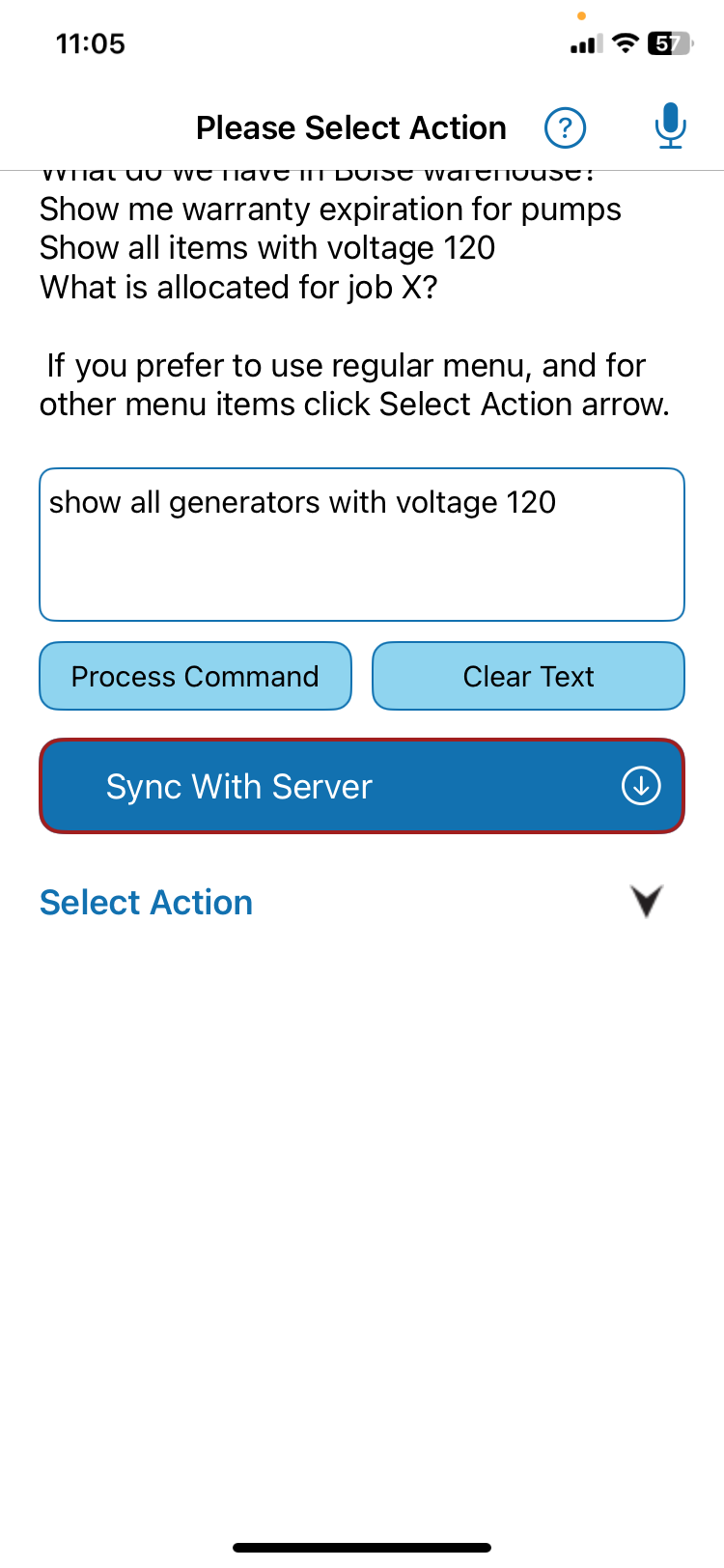
Offline and on-device behavior depends on the application. The verified example is our own product, QR Inventory, shown below.
Ways we help
We review the work, system access, data, customer rules, and intended result before choosing an implementation path.
We can trace failed handoffs, duplicate updates, mismatched records, permission problems, and unreliable imports after access and feasibility are checked.
See our AI workflow automation and software integration services.
Where it fits
Examples include HVAC, plumbing, electrical, equipment, service, and maintenance teams.
We offer these services for utilities, municipal water treatment and processing operations, public works, and other public-sector field teams.

What runs in production today
QR Inventory demonstrates on-device voice input, structured inventory lookup, guided transactions, offline request queuing, and AI-assisted onboarding in a production mobile application.
Deployment and privacy
BusinessForward can help choose where the AI processing should run, based on the application, data, workflow, and customer requirements.
Choices can include approved commercial cloud processing, BusinessForward-controlled private infrastructure, customer-controlled infrastructure, and on-device processing when the application and workflow support it.
We make sure customer data is not used for model training, retention is defined, and access is restricted. A dedicated environment is available when required and may cost more.
Common questions
No. BusinessForward adds a focused workflow to existing software when practical access and permissions are available.
We design parts, tools, and inventory workflows first. We also connect work orders, service requests, notes, status, photos, and approved updates.
Sometimes. QR Inventory is the specific verified example: it processes voice on the device and can queue a structured request until service returns. Other applications need a feasibility review.
Actions you have approved as routine run automatically. Everything else waits for a person.
Many business systems can receive workflow updates, but the available access differs by product. During the review, we confirm what your systems support.
Yes. We offer workflow design for utilities, municipal water treatment and processing operations, public works, and other public-sector field teams.
Customer data is not used for model training. Retention is defined, access is restricted, and where the processing runs is chosen for the application and workflow.
Start with one slow or disconnected workflow. We review the work, systems, data, rules, access, and result before recommending an approach.
Related services
Start with a clear field or office handoff. Keep the software that still serves the business.