
Start with known sources
Find the records employees already trust
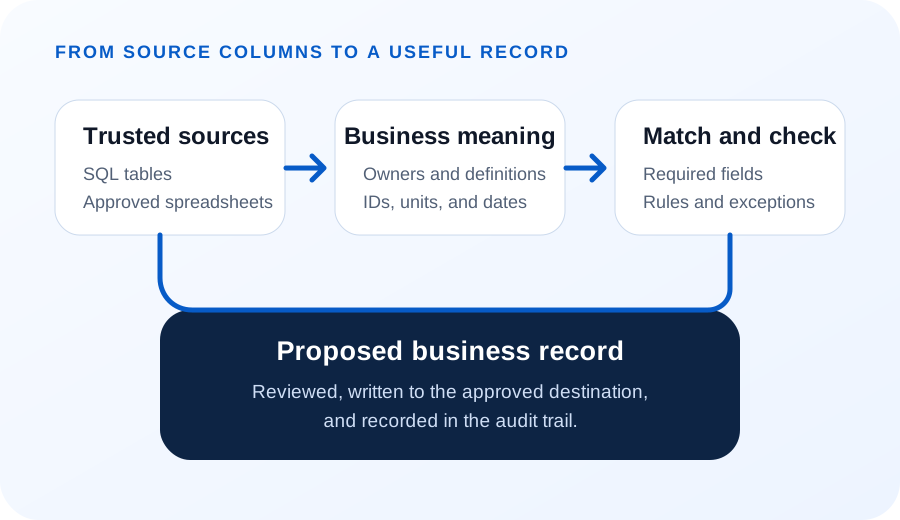
Identify the tables, sheets, and reports people use to answer the question today. Record who owns each source, how often it changes, and which copy is current.
A database table may be more controlled than a spreadsheet. A spreadsheet may still hold approved facts that no other system contains. Use the source that the business can explain and maintain. When those trusted records sit scattered across several systems, see finding the business value already in your data.
Define each field
Match columns to business meaning
A column name does not always explain its use. “Status,” “amount,” or “date” may mean different things in different systems. Define identifiers (IDs), units, formats, and allowed values before combining records from different systems (in database terms, before joining them).
Match each informal label to the correct customer, project, item, asset, or order. Keep unclear matches out of the automated path.
Check before writing a record
Validate before writing a record
Check required fields, types, ranges, duplicates, and permissions. Compare important values with the source system when possible.
A valid row is not always a valid business action. Customer rules decide whether the workflow may create a record, prepare one for review, or stop for a person.
Keep the path visible
Keep an audit trail
Record the source, matched IDs, checks, result, and person or rule that approved the action. This helps teams review an exception and support the workflow later.
Do not keep extra sensitive information without a reason. Retention and access should match the business need. See how this fits a larger flow in from data pipelines to better business decisions.
One pass, start to finish
A worked example: one spreadsheet, one system, one rule
Follow one sheet all the way through. A crew leader keeps a spreadsheet of material used per job, and the goal is to turn each row into an inventory adjustment in the system that owns stock. The rule is one sentence: write the adjustment only when the row matches exactly one known job and one known item.
The sheet has five columns — date, job, item, quantity, and a notes field people actually use. The job column holds whatever the crew leader typed that day: “River Crossing,” “river xing,” sometimes a job number.
Matching turns those informal labels into identifiers. “River xing” resolves to project 4471 because the project list records that alias. A label with no alias and no close match resolves to nothing, and the row stops there rather than guessing.
Then the checks run. Quantity must be a positive number in the unit the system stocks the item in, so a row reading twelve boxes becomes 144 pieces only if a box is defined as twelve. The date must fall inside the job's active window. The item must still be stocked at that location.
A row that clears both steps becomes an adjustment against project 4471. The log keeps the sheet name, row number, matched records, completed checks, and the rule that allowed the update. Six weeks later, when someone asks why stock moved, that line answers the question.
A row that fails goes to a review list with its original text, what it matched, and which check stopped it. Expect plenty of those on the first run. Failed rows reveal naming and data problems the business can fix once.
Limit the first scope
Start with one record type
Choose one record people can verify, such as a material request, service update, order line, or inventory adjustment. Test normal records, missing fields, duplicates, and uncertain matches.
BusinessForward can help turn supported source data into checked records through AI Data Extraction and Business Record Automation, including email attachments through email-to-ERP automation.
Short answers
Common questions
Can we just keep working in the spreadsheet?
Often yes, and sometimes that is the right answer. A spreadsheet is a fine place to collect facts and a poor place to be the record other software trusts. Ask who reads it after the person who wrote it. Once the answer is another system, the rows need identifiers, units, and checks, and that work has to happen somewhere whether or not the sheet stays.
Who owns the rule that allows a write?
Someone in the business, not the developer. The business must decide which rows are routine enough to save without manual review. Actions you have approved as routine run automatically. Everything else waits for a person. Write the rule where the people doing the work can read it, and review it after the first month of exceptions.
Related reading
Continue exploring
Find the Business Value Already in Your Data
Start with the questions your existing data can already answer.
From Data Pipelines to Better Business Decisions
See how a sound data pipeline moves and checks information.
Email-to-ERP Automation
Turn incoming email and attachments into checked business records.