
Define the result
A chatbot is not always the goal
A chat screen is only one choice. The result may be an answer with sources, a matched record, a staff guide, a draft update, or a clear request for more facts.
Decide who needs the result and what they should do next. Use normal search or a ready-made product if it solves the full problem.
If the problem is a model’s repeated behavior rather than missing reference facts, compare LoRA fine-tuning with retrieval and workflow rules before choosing an approach.
Keep the scope practical
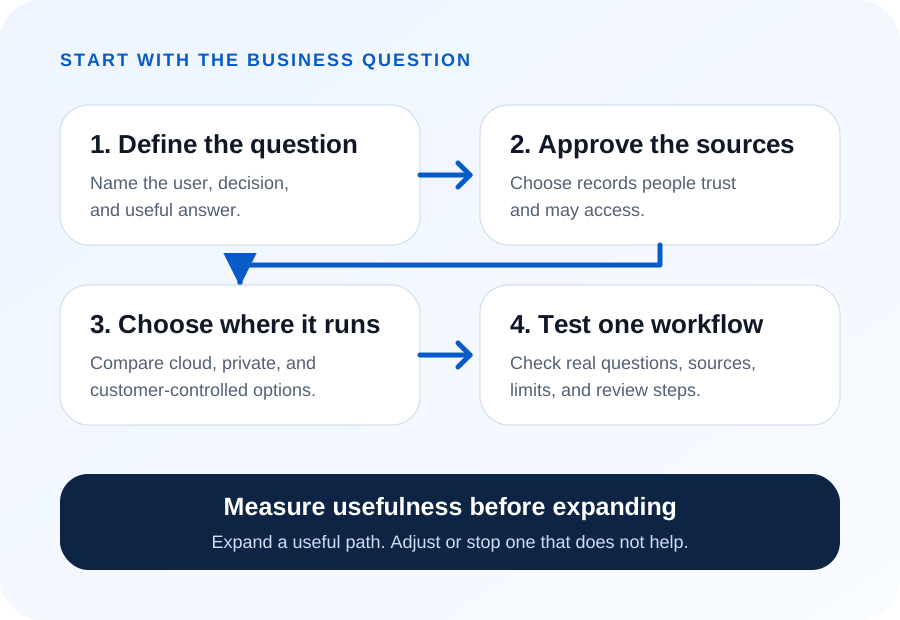
Start with the business question
Choose questions staff ask often and can check in known records. Decide three things up front: how long an answer may take, which sources count as trustworthy, and who handles a question the system cannot answer clearly.
The Add AI or Replace Software guide helps compare current tools, focused custom work, and new software before a build starts.
Use information people trust
Choose the approved sources
List the files, records, or other sources that may support the answer. Name an owner and confirm who may open each source.
RAG does not fix missing records or unclear owners. Source quality, labels, access, and update rules still shape the result. When those sources sit scattered across several systems, see our guide to finding the business value already in your data.
Follow one question
A worked example: one purchasing question
Here is one question moving through a RAG workflow from end to end. A project manager asks what has been ordered so far for the River Crossing job. The workflow checks who is asking, searches the approved purchasing records, and answers with the order lines and a link to each one.
The access check comes first. This manager can open River Crossing records, so the search covers only the records for that job. It finds four purchase orders and keeps the source order number with every line it uses.
The answer lists what was ordered, by whom, and when, with that order number beside each line. One of the four covers Change Order 184 for $12,480. The manager opens the link, sees the same figures in the purchasing system, and is done in seconds.
One order has no approval date on file. The answer says so and marks the line unconfirmed instead of quietly leaving it out.
Know the limits
What RAG cannot fix
Retrieval finds what is on file. It cannot supply a fact nobody wrote down, and it cannot decide which of two records is right. Two record problems cause most wrong answers.
The first is the change nobody logged. A crew swaps one fitting for another on site and no one updates the order, so the search returns the original line and the answer is confident and wrong. The repair is a logging habit, not a better model.
The second problem occurs when two sources hold different values for the same fact. A unit price sits in a planning sheet and again in the order system, and the two do not agree. The search may return both. If no rule identifies the trusted source, the workflow should stop and ask for review.
Settle those questions before the build. Both problems show up when you test with real records, and neither shows up in a demo built on tidy sample data. For the retrieval designs that fit around those constraints, see RAG architecture patterns.
Choose the data path
Decide where the model runs
The model can run in a commercial cloud, on servers we control, or on servers you control. Pick the place that matches how sensitive the data is — the expandable below compares the options.
Read the hosting and data options
Options include an approved commercial cloud, BusinessForward-controlled private infrastructure, or customer infrastructure. Customer data is not used for model training. Each project has defined retention and restricted access.
A dedicated environment is available when required, and dedicated environments cost more. BusinessForward is vendor-neutral and does not receive referral fees, reseller commissions, or other compensation from software or AI vendors it may recommend.
Test before expanding
Measure usefulness before expanding
Test real questions with real users and sources. Check four things: did it find the right facts, did it name its sources, did it respect access rules, and did it say when the available sources did not support a clear answer?
Grow only when the work gives a useful result under the set rules. Change course if another path fits better. See how BusinessForward can add focused AI to existing software.
Short answers
Common questions
How is this different from a search box?
A search box hands you documents and leaves the reading to you. A retrieval workflow reads them and answers the question, with links back to what it used. That matters most when the answer sits across several records at once. When one document holds the whole answer, ordinary search is cheaper and usually better.
What does it cost to keep running?
The build is not the whole cost. Sources get replaced, permissions change, and documents move, so someone has to keep the connections and access rules current. Budget for a named owner and a review schedule. A workflow nobody maintains keeps answering from last quarter's records without saying so.
Related reading