
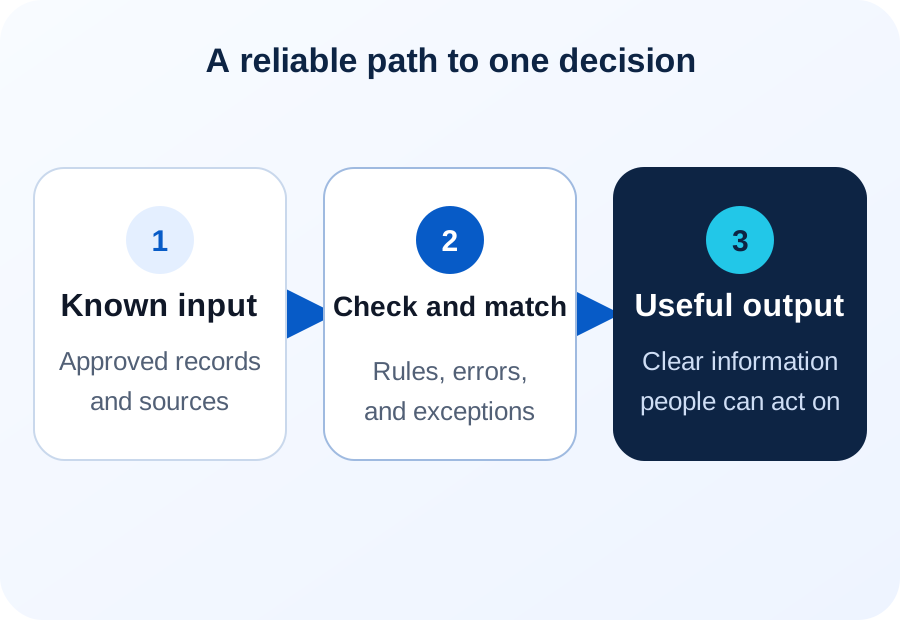
Understand the path
A pipeline moves data between steps
The source may be an app, database, file, email, or approved form. The result may be a report, alert, business record, or another system.
Map each step before adding AI. For each step, name who owns it, when it runs, what format the data arrives in, and what comes out the other end — then the team can see exactly where the path breaks.
One small pipeline
A pipeline on one page
Here is one small pipeline from start to finish, following the steps shown above. An order arrives by email, the workflow makes three matches against known records, the checks run, and what passes becomes a draft entry in the accounting system while what fails goes to a person.
A customer emails an order for forty valves against a standing account. The workflow pulls out the customer, item, quantity, price, and requested delivery date, then matches each: which account is this, which item number is a two-inch valve, and is there an open job to bill it to.
An order that clears every check becomes a draft entry in the accounting system — QuickBooks, say — for the bookkeeper to post. One that fails arrives with the message, the matched fields, and the reason it stopped, so nobody reopens the email to work out what happened. The workflow does not guess which account to use. It is safer to pause than to create an entry under the wrong account. See email-to-ERP automation for this exact pattern, built out as a service.
Know what enters
Reliable inputs
Confirm which source is official and how often it changes. Check IDs, dates, units, key fields, and access. Do not keep copies of the same data that no one can reconcile — if two systems hold the same record, decide which one is the source of truth.
Free text takes two steps: work out what it means, then match it to the right record. Tables may need clear field connections and checks for duplicate records. Both paths need a clear owner. When the inputs are SQL tables or spreadsheets scattered across systems, see turning SQL and spreadsheet data into useful records and finding the business value already in your data.
Plan for failure
Checks and exception paths
A pipeline should find missing values, odd formats, double records, failed links, and weak matches. Each problem needs a clear next step.
Records that fail a check can wait, retry, or go to a person with enough facts to fix them. Updates you have approved as routine go through automatically after the checks pass.
Start with these
The three checks that catch most problems
Most bad records come from a short list of causes. Three checks catch most of them: is the record complete, does it match exactly one known thing, and is the value plausible. Set each one to stop the record, hold it, or warn and carry on.
Completeness comes first. Does the record carry every field the destination requires? A missing job code or unit of measure fails at the far end anyway, and it is cheaper to catch at the door.
Matching comes second. Does each name or code resolve to exactly one record? Two matches is a problem and no match is a problem; only one may pass. Send the rest to a person with both candidates shown.
Plausibility comes third. A quantity of 4,000 where the account has never ordered more than 100 is usually a typo, or a mix-up between boxes and single items. A range check does not need to be clever; it needs to exist.
Deliver something useful
Useful outputs
The result should answer a question or support a task. It may show a checked total, draft a record, update an approved system, or alert a worker.
AI Data Extraction and Business Record Automation can help when input needs interpretation and must be matched to a business record.
Keep the first result narrow
Improve one decision at a time
Choose one choice staff make often. Define the facts they need, how fresh they must be, and what staff do next.
Check whether the new path is more reliable and easier to support. When many systems take part, AI Workflow Automation and Software Integration can link the approved handoff. If this pipeline is one piece of a wider plan, start with our five-step AI strategy guide.
Short answers
Common questions
How much of this needs AI?
Less than people expect. Moving, checking, and writing records is ordinary software work and should be built that way. A model earns its place at one step: turning free text — an email, a note, a spoken sentence — into fields the pipeline can check. If the input is already a table, you may not need one.
What happens when the destination system is down?
The pipeline should hold the record and retry, not drop it and not write it twice. Every record therefore needs an identifier the destination recognizes, so a second attempt updates the same entry instead of creating a duplicate. Decide up front how long it retries and who hears about it when it stops.
Related reading
Continue exploring
Find the Business Value Already in Your Data
Start with the questions your existing data can already answer.
Turn SQL and Spreadsheet Data Into Records
Match business meaning and validate details before writing a record.
Email-to-ERP Automation
Turn incoming email and attachments into checked business records.