
A focused model update
What LoRA changes
Fine-tuning teaches a model from selected examples. A full fine-tune may change many of the model's internal settings.
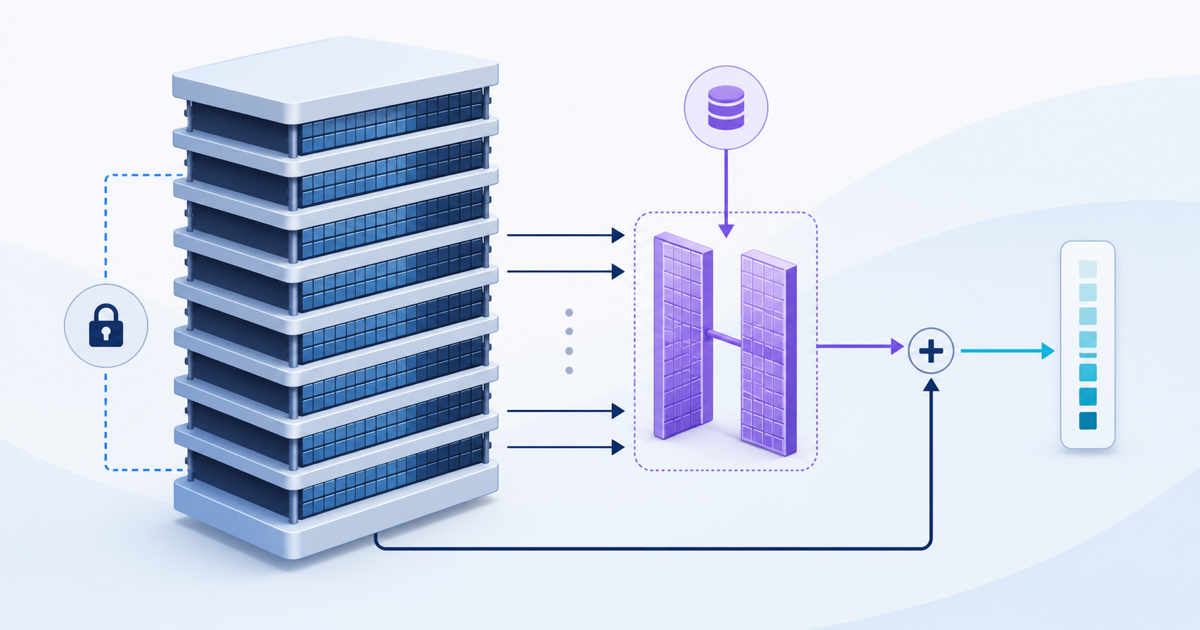
LoRA keeps the base model fixed during training and learns a smaller update. That update is often called an adapter. It works with the base model when the application runs.
This method can reduce the amount of model data changed during training. The cost and fit still depend on the model, data, task, testing, and hosting choice.
Technical detail: the smaller update
LoRA represents part of a model change with two smaller matrices. A matrix is a table of numbers used in model calculations.
The chosen rank controls the size of those tables. A larger rank can represent more change, but it also adds training and testing work. Teams should choose it through measured trials.
Start with the behavior
When fine-tuning may help
Fine-tuning may fit when a model must repeat a narrow behavior that clear examples can teach. The target could be a response format, a labeling task, or a set of instructions.
The behavior should stay useful even when reference facts change. Teams also need enough approved examples to train and test the model.
Best-fit summary
Map the full path before training
You provide reviewed examples. The training teaches the model one pattern. Separate tests and human review confirm it worked. The result is a small model update your application uses.
A successful test shows whether the update improves the chosen task. It does not prove that the same update will work for every prompt or business process.
Use the simplest reliable approach
When retrieval or workflow design is the better answer
Retrieval-augmented generation gives a model approved reference material at request time. Retrieval means finding useful content before the model answers. See RAG architecture patterns for how to choose between retrieval designs, and custom RAG solutions beyond basic chatbots for why this goes further than a chat screen.
This approach may fit when the answer depends on current policies, manuals, product details, or other facts that change. Teams can update the source material without training the model again.
Some problems need no model update. Better data access may give the application the missing facts. Ordinary workflow rules may also handle checks, approvals, and record updates more clearly.
For example, a rule can reject a wrong amount before a record is saved. An API is a controlled way for software systems to share data. It can fetch the current item or customer record.
| Approach | Best fit to investigate | What still needs checking |
|---|---|---|
| Workflow rules and data access | Defined checks, approvals, or a missing current record. | Correct records, permissions, and exception handling. |
| Retrieval (RAG) | Answers that depend on approved documents or facts that change. | Source quality, access rules, and whether the answer uses the retrieved evidence correctly. |
| LoRA fine-tuning | A repeated, narrowly defined model behavior that good examples can teach. | Representative training examples, performance on held-out cases, and a way to restore the previous version. |
For the wider software decision, compare adding AI to an existing system with replacing it. See the Add AI to Existing Software service when one part of a current workflow needs help.
Two problems that look like training
When LoRA is the wrong tool
Two problems arrive looking like training problems and almost never are. If the model is missing facts, it needs retrieval rather than training. If the model has the facts but writes them in the wrong shape, it needs a clearer prompt.
Take a vocabulary problem first. Crews call a part a stub-out, the catalog lists it as a copper drop tube, and the model returns a description where the workflow needs an item number. Training on today's catalog would teach today's names, and the catalog changes whenever purchasing adds a part.
Retrieval fits that case. Put the current catalog where the workflow can search it, and the item number comes back with the answer. When a part is added on Monday, Monday's answers already include it.
Now take a format problem. The model summarizes a service call well, but it writes a paragraph when the work order needs four labeled fields. Nothing is missing from the answer; only its shape is wrong.
Name the four fields in the prompt, show one filled-in example, and have the software check those fields before the record is saved. You can make that change and measure it the same afternoon. Fine-tuning would add cost without fixing the formatting problem.
Fine-tuning becomes the reasonable choice once both of those are ruled out, when the behavior itself is what must change and reviewed examples can show it.
Evidence before deployment
Data, testing, and where the model runs
Training data should match the target task and have clear permission for use. Remove weak, duplicate, or conflicting examples before training.
Keep evaluation examples separate from training examples. Then compare the updated model with the starting model on the same tests.
Review useful answers, wrong answers, unsafe responses, and cases where the model should decline. Human review may still be needed before an answer becomes a business action.
BusinessForward can work with commercial AI models, host a private model on servers we control, or install one on servers you control.
The right choice depends on the selected model, data rules, system access, security needs, and operating support.
Technical detail: what to record during evaluation
Record the base model, adapter, training data version, prompts, test cases, and scoring method. This makes later comparisons easier to repeat.
Test the complete application, not only the model. Access rules, retrieved data, prompts, software code, and human review can all change the final result.
Release discipline for models
Version control and rollback: how to return to an earlier model version
Treat a trained model the way you treat released software. Every adapter should carry a version, and you should be able to put the previous version back in minutes without training anything again. If a vendor cannot show you both, treat the work as unfinished.
Versioning is easier to run with LoRA than with a full retrain. The base model stays fixed, so an adapter is a small file, several versions can sit side by side, and switching between them is a configuration change rather than a rebuild.
Ask a vendor, or your own team, for these five things by name:
- Adapter version history. You should see every version, when it was trained, and what changed. A single file with no history leaves nothing to roll back to.
- One-step rollback. Ask what an operator does when a new version starts answering badly on a Monday morning. The answer should be one action that points the application back at the previous adapter.
- Evaluation results stored with each version. The same test set and the same scoring should be recorded against every version. Without them, nobody can say whether a new version is better or only newer.
- Base-model pinning. An adapter is trained against one base model, and it can behave differently if that base moves underneath it. Ask which base version the application uses and who decides when it changes.
- A named approver. Someone has to decide that a version may answer live requests. Write down who that is, what they review, and where the decision is recorded.
Practices differ between hosted services, self-hosted setups, and consulting teams, so ask about each item rather than assuming it is covered. Missing version and rollback controls become a problem when a new version performs poorly.
A practical decision check
Questions to answer before fine-tuning
- What exact behavior needs to change?
- Can approved examples show the desired input and output?
- Does the task need new behavior, or does it need current facts?
- Could software rules, better prompts — the written instructions an application gives the model — or better data access solve it?
- How will the team compare the update with the current model?
- Where will the model run, and who will support it?
If an existing product already handles the task well, use it. Custom training makes sense only when a clear gap remains and the team can test it.
Next step
Start with the workflow, not the training method
Bring the task, sample inputs, current software, and review rules. We can help separate model needs from data and integration needs.
Compare ways to improve your existing softwareShort answers
Common questions
How much data does LoRA fine-tuning need?
There is no fixed number, and anyone who offers one without seeing the task is guessing. What decides it is coverage and consistency: enough reviewed examples to show the behavior, including the awkward cases, plus a separate set you hold back and never train on.
A small set of clean, consistent examples teaches more than a larger set that contradicts itself. If holding back a test set leaves too little to train with, the honest answer is that the data is not ready yet.
Can we undo a fine-tune?
Yes, when the work was set up for it. LoRA leaves the base model untouched, so undoing means pointing the application at the earlier adapter, or removing the adapter and running the base model with its prompt.
Reverting the model file may be simple. The team still needs to know which version was running, how it was tested, and who may restore the earlier version.
Will fine-tuning stop the model from inventing details?
No. Training on examples teaches a pattern; it does not give the model a fact it can look up. When a wrong answer comes from missing information, retrieval and a check against the source record are the fixes.
Training can even make an invented answer read more confidently, because the model has learned the shape of a good answer without learning its content. That is one reason evaluation should include the cases where the model ought to decline.
Related reading