
Use current business information
What RAG changes
A general model answers from what it learned before the request. RAG adds selected company records, documents, or instructions to that request so the response can use current approved information.
Retrieval does not make every answer correct. The system still needs clear sources, access rules, checks, and a safe response when the supporting source information is weak. See custom RAG solutions beyond basic chatbots for how this goes beyond a chat screen, and LoRA fine-tuning for when the need is a behavior change rather than new information.
Follow the request
A practical request path
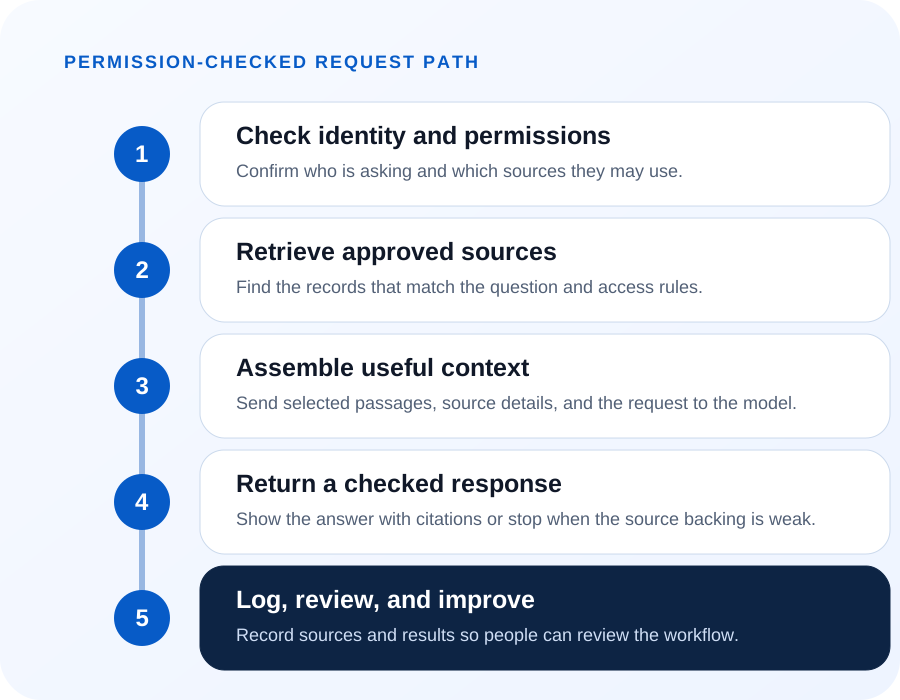
First, identify the user and the question. Next, search only the sources that user may access. Choose useful passages, add their source details, and send that context to the model.
The response can include citations, which are links or labels showing where the supporting information came from. The workflow should also log the request, sources, and result for later review.
Protect the source boundary
Permissions before retrieval
Access checks belong before the search, not only after the answer. A person should not retrieve a document, customer record, or project note they could not open in the source system.
The design may use source permissions, separate indexes, filters, or customer-specific rules. The right pattern depends on the current applications and their access controls.
Separate indexes by system
Pattern 1: One index per source
In this pattern every source system keeps its own search index. An index is a prepared copy of text that the system can search quickly. The workflow picks the index that fits the question and searches only that one.
It fits when systems have different owners and different access rules. Inventory belongs to operations, contracts belong to the office, and each group decides who may read what. The permission check stays at the source boundary, where the owner already set it.
The cost is setup. Each source needs its own preparation, its own refresh schedule, and its own access rules, so there is more to build and more to keep running. What you get back is a clean audit trail, because the log shows which index answered and under whose access.
Say a project manager asks what was ordered for a job. The workflow searches the purchasing index alone, limited to the records that manager may open. The answer cites the purchase order it used, and the log shows the same.
One index, filtered by permission
Pattern 2: One shared index, filtered at query time
Here every approved source goes into a single index, and each search carries a filter built from the asker's permissions. The filter decides which passages the model is allowed to see. There is one index to build and one to keep current.
It fits smaller teams where most people may read most of the material. There is one refresh job to watch and one place to look when an answer comes back wrong.
The main risk is incorrect access control. Every answer depends on that filter being right, so one wrong tag on one document can expose it to everyone who asks. Permission changes in the source system also have to reach the index quickly, or the copy keeps enforcing last month's rules.
Say a service team keeps manuals, job notes, and price sheets together. A technician asks about a pump seal, and the filter drops the price sheets before the search runs. If a new document arrives without its tag, it stays open to every search until someone fixes the tag.
Ask the source at answer time
Pattern 3: Retrieve from the live system
This pattern copies nothing in advance. When the question arrives, the workflow calls the source system through an API — a controlled way for two software systems to exchange information — and answers from what comes back. The source system checks access on that call, the way it would for any other request.
It fits data that changes by the minute, such as inventory counts, open work orders, or the status of a job. A copied index would already be out of date by the time someone read the answer.
The tradeoffs are slower responses and limits on what the source system can return. Every answer waits for the other system, and a slow or unavailable source means no answer at all. An API also answers only the questions it was built to answer, so this pattern suits record lookups better than searching through long documents.
Say a worker asks how many valves are left at the yard. The workflow reads the count from the inventory system and answers with that number. Nothing was stored ahead of time, so the answer matches what the system shows at that moment. See finding the business value already in your data for the wider question of when a shared store may help.
Three questions
How to choose
Three questions usually settle it. Ask who owns the data, how fast it changes, and what an audit has to show. A system may combine these patterns because different sources have different owners, update schedules, and access rules.
Who owns the data? If several departments run their own systems and set their own access rules, keep their indexes separate. If one team owns everything and access is uniform across the group, a shared filtered index is less work to run.
How fast does it change? Manuals, contracts, and specifications hold still long enough to index on a schedule. Counts, statuses, and balances move faster than any refresh, so those belong in a live lookup.
What must an audit show? If you have to prove which source answered a question and who was allowed to see it, separate indexes make that a short conversation. If a shared index is the practical choice, decide up front how the permission filter gets tested and how often.
Show supporting source information
Citations and result checks
Citations help a reader inspect the source. They do not replace a result check. The workflow can require enough supporting source information, compare key values, or send sensitive actions to an employee.
If the search finds weak or conflicting information, the system should say that it needs more context. It should not fill the gap with a confident guess.
Fit the existing environment
Deployment choices
Retrieval, model processing, and logs may run through approved commercial cloud services, private BusinessForward-controlled infrastructure, or customer-controlled infrastructure. The choice depends on the application, data, risk, and support needs.
See how this architecture can support AI added to existing software. To review a specific source and access path, contact BusinessForward.
Read the technical design checklist
- List approved sources and their owners.
- Apply identity and permission checks before retrieval.
- Keep source identifiers with selected passages.
- Define what happens when supporting source information is weak or conflicting.
- Log only the details needed for review, security, and support.
Short answers
Common questions
How current is a retrieval answer?
That depends on the pattern. An indexed source is only as current as its last refresh, so an index rebuilt overnight answers with yesterday's material. A live lookup answers with what the source holds at that moment. When the difference matters for a question, show when the material was last refreshed next to the answer.
What happens when two sources disagree?
The workflow should show both and let a person decide. A model may choose one conflicting record without enough support. The workflow should show the conflict and ask a person to decide. Log those conflicts as well, because two systems that keep disagreeing point to a data problem retrieval cannot fix.
Does retrieval train the model on our business information?
No. Retrieval places selected material into the request at the moment of the answer, and the model's internal settings do not change. Whether a hosting provider may keep or reuse those requests is a separate question, and it belongs in the hosting agreement rather than in the architecture.
Related reading
Continue exploring
Custom RAG Solutions Beyond Basic Chatbots
See how retrieval turns approved sources into a checked answer.
LoRA Fine-Tuning: When It Makes Sense
Compare fine-tuning with retrieval for a behavior change.
Find the Business Value Already in Your Data
Start with the questions your existing data can already answer.