
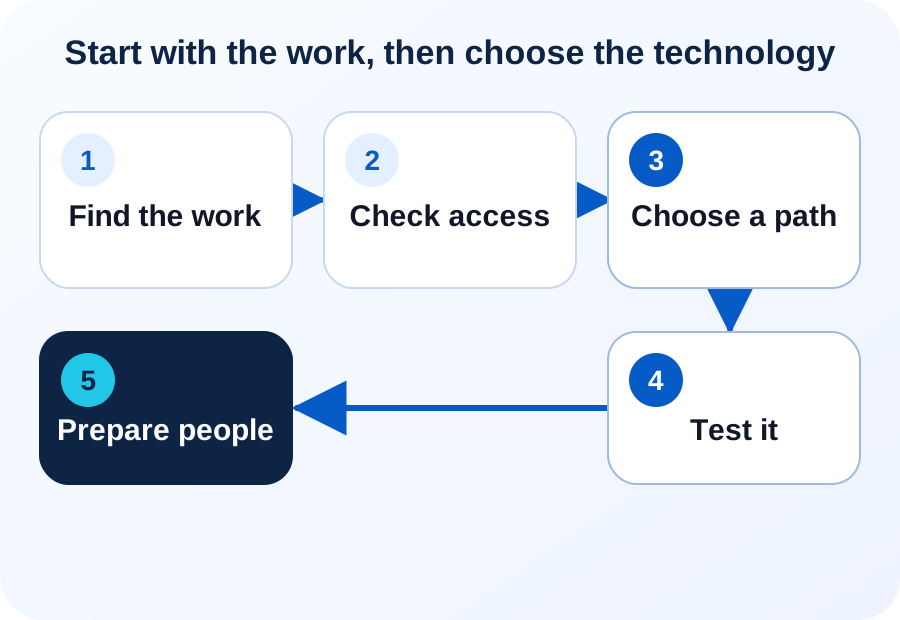
Step 1
Identify repeated work
Write down the task staff repeat, the delay it causes, and the result they need. Start with daily work, while the handoffs, rules, and records are still fresh in people's minds.
Look next for a process that breaks rather than one that merely drags. Failed updates, duplicate records, poor matches, and missing error handling are common warning signs.
Take one example. A warehouse lead is asked a dozen times a week what stock is left on truck 4. He calls the driver, waits for a callback, and writes the number on a sticky note. Twelve calls, twelve numbers, nothing on file.
Step 2
Check software and data access
List the current apps, source records, users, access rules, and ways to move data. An API is a controlled way for software systems to exchange information.
Also check built-in tools, exports, links, files, and database access. A good idea cannot work safely if the needed data or action is out of reach.
Follow the truck count through this step. The number lives in the inventory app, so the question is whether another system may read it and which supported connection it can use. If it only ever exists on a sticky note, no tool can reach it yet. When the goal is a steady flow between systems rather than one single check, see from data pipelines to better business decisions.
Step 3
Choose improvement or replacement
Keep the current system when it handles the core job and one small change solves the issue. Replace a part or the core when that fixes the real cause.
Say invoices arrive by email and a clerk types each one into the accounting system. The accounting system is not the problem here; the typing is. That points to a small addition beside the current tools rather than a replacement for them.
Automation platforms — tools that connect your business apps without custom programming — are one common choice. Make, Microsoft Power Automate, and Zapier are examples, not our recommendations. BusinessForward reviews the work and suggests the simplest reliable choice from the available AI service options.
Read our vendor policy
BusinessForward does not receive referral fees, reseller commissions, or other compensation from software or AI vendors it may recommend.
Use the Add AI or Replace Software guide to compare the paths on the same facts.
Step 4
Build and test one path
Use real records and real users. Test the normal case first. Then test missing facts, uncertain matches, access limits, and failed steps. Confirm that each problem has a clear response. Keep a manual path while the first workflow proves itself.
Take a materials question: how much of one item is left for one job. Run it on a project the team knows well, then on the messiest one you have. The second run is the useful one — it shows what happens when a record is missing or a name is spelled three ways.
Set one useful result before you grow. AI Workflow Automation and Software Integration can link approved steps across more than one system.
Step 5
Prepare people and support
Explain what will change, what will stay, and when a person must check the result. Train staff on the real work, not a stock demo.
Name an owner for checks, guides, fixes, and later updates. A plan works only when the company can use and support what it builds.
Someone will ask why the material count differs from what they expected. Name who answers that before the workflow goes live. Without a named owner, staff may return to the old process and stop using the new workflow.
The first four weeks
What a first month looks like
A first month is short on purpose. It should end with one narrow path running for a handful of people and an honest list of what the path still cannot do.
Week one is watching: sit with the people doing the task, count how often it happens, and write down every exception they mention. Week two is access: sample records, a test account, and the permission rules in writing. Projects stall here more than anywhere else.
Week three is the build — narrow, on real records, with the old way still running beside it. Week four is the comparison: did it save time, did anyone redo the work, what did it get wrong. Then widen the scope, change the approach, or stop. Stopping after one month is a cheap and honest result.
Short answers
Common questions
Do we need clean data before we start?
You need reachable data, not perfect data. If the records exist and someone can grant access, that is enough to begin — the first test will tell you how clean they are. What stops a project is a fact that lives only in someone's head, or data nobody may release.
Our software vendor already promises AI features. Should we wait?
Try the vendor's feature first. It costs less than custom work and the vendor supports it. Check whether it covers your exact task, respects your access rules, and reaches the other systems involved. If it does all three, custom work may not be needed for that task. Consider custom work only for requirements the product does not cover.
Related reading